

What are Budget Adjustments?
Budget adjustments update compensation budgets after a cycle starts, so teams can respond to headcount changes, org shifts, and revised finance targets. Instead of restarting the plan, adjustments recalibrate available pools and keep allocations aligned to current constraints.
In CompLogix, admins can adjust pool amounts and allocation logic, then the platform recalculates rollups and budget utilization so managers and approvers see updated totals immediately, without rebuilding spreadsheets or manually reconciling versions.
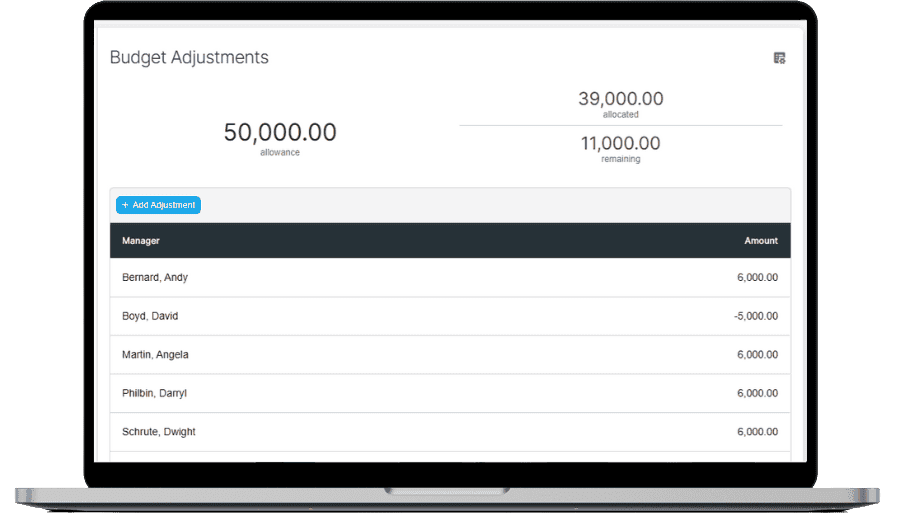
Budget Adjustments in Action
Rebalance budgets without breaking the planning cycle
Make targeted updates to pools and allocations, then validate downstream impact before final approvals.
- Increase or decrease pools by population or department.
- Reallocate budget based on revised guidelines or org changes.
- Review updated utilization and rollups before approvals.
Frequently Asked Questions
How do budget adjustments work in CompLogix?
Budget adjustments update pool amounts or allocation rules during an active cycle. CompLogix then recalculates budget utilization and rollups so managers and approvers see the updated available budget without restarting the plan.
When should teams use budget adjustments in CompLogix?
Use budget adjustments after material changes such as new headcount, backfills, reorganizations, or revised finance targets. The goal is keeping the plan current while avoiding rework and late cycle spreadsheet reconciliation.
Does CompLogix preserve manager inputs after a budget adjustment?
Budget adjustments are intended to update pools and rollups while keeping existing recommendations visible. Teams can then review which recommendations exceed the updated budget and make targeted changes instead of recreating the cycle.